How to Forward Email in Outlook 2021

You can forward the email using Outlook 2021.


1. Open Outlook 2021.

outlook-2021-icon.gif


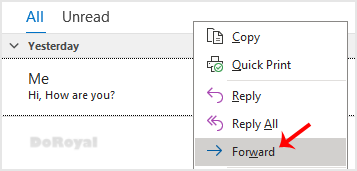
2. Go to Inbox, right-click on the message you want to forward and click on Forward.
outlook-2021-forward-icon.gif


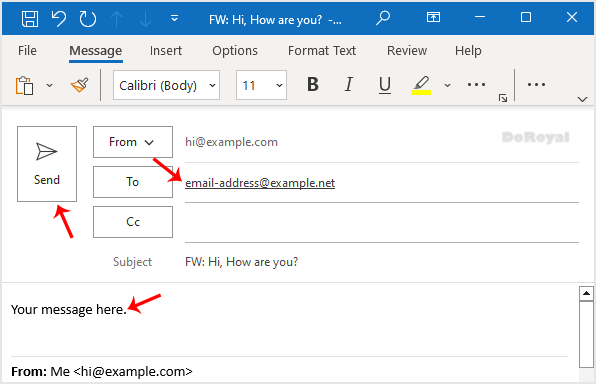
3. Enter the email address of the person you want to forward the email to in the To field. Type your message in the message box and click Send.
outlook-forward-email.gif


  • 0 Utilisateurs l'ont trouvée utile
Cette réponse était-elle pertinente ?

Articles connexes

How to Delete Email Messages in Outlook 2021

You can easily remove email in Outlook 2021.   If you use the POP email protocol, the email...

How to Check for New Email in Outlook 2021

  1. Open Outlook 2021.   2. In the left panel. You can see a list of your email accounts,...