How to Forward an Email in Mozilla Thunderbird

You can forward an email to other email accounts using Mozilla Thunderbird.


1. Open Mozilla Thunderbird.
mozilla-thunderbird-cpanel-icon.gif


2. Go to Inbox. Select the message you want to forward, and it will show the Forward option. Click it.
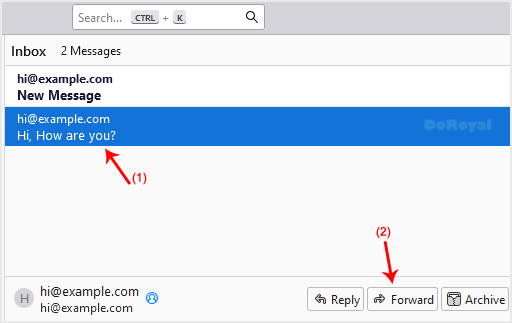
forward-email-select-message.gif


3. Write your message, enter recipient email in To field, then click Send.
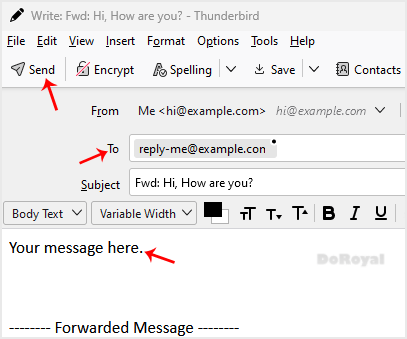
mozilla-thunderbird-email-forwarded.gif

  • 0 Els usuaris han Trobat Això Útil
Ha estat útil la resposta?

Articles Relacionats

How to Check for New Email in Mozilla Thunderbird

Thunderbird is an email client software. You can work with it in the following way. 1. Open...

How to Delete Email Messages in Mozilla Thunderbird

You can easily remove email in Mozilla Thunderbird. If you use the POP email protocol, the...